Storage unit inventory checklist
A practical storage unit checklist: what to settle before you rent, how to pack and label boxes, how to lay out the unit and keep an inventory current.
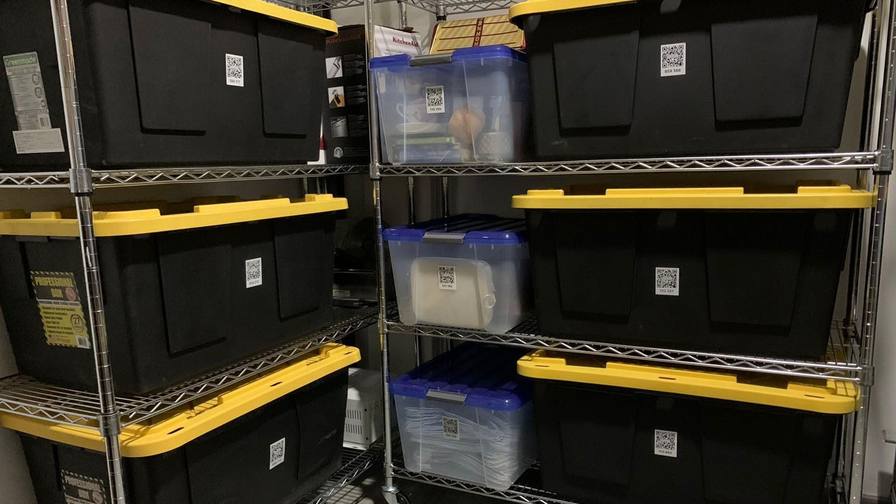
A storage unit is easy to fill and hard to use. You load it in an afternoon, close the door, and the next time you need something you’re standing in a narrow corridor trying to remember which box, behind which stack, holds the thing you came for.
The fix isn’t a bigger unit. It’s a little planning before the boxes go in, and an inventory that tells you what’s in each box and where it sits. This checklist covers both, from the decisions you make before you rent to the habits that keep the inventory true years later.
Before you rent
Settle these before you sign anything.
- Make a list of what’s going in. Write down the large items (furniture, appliances, bikes) and estimate the number of boxes. It is much easier to choose a unit size from a list than from a guess, and the list becomes the start of your inventory.
- Check access. Find out the access hours, whether you can drive up to the door, and how far the unit is from the loading area. If you’ll visit often, a ground-floor or drive-up unit saves a lot of carrying.
- Think about climate. Wooden furniture, electronics, photos, documents and musical instruments can be affected by heat, cold and humidity. Ask whether the facility offers climate-controlled units and decide which of your things need one.
- Read the facility’s rules. Banned items typically include perishable food, anything flammable and hazardous materials. Ask for the facility’s own list rather than guessing.
- Check your insurance. Ask your insurer whether your home or renter’s policy covers belongings in storage, and ask the facility what coverage they require.
- Bring the right lock. Some facilities specify a lock type. Check before you buy one.
Before you pack
- Declutter first. Every box you don’t store is space you don’t pay for. Sell, donate or recycle anything you wouldn’t miss.
- Get supplies in a few standard sizes. Boxes of the same size stack straight and stable. Use plastic totes with lids for anything that shouldn’t get dusty or damp.
- Gather labels, a marker, packing paper and tape. One label per box, plus a few spares.
- Set up your inventory before the first box. In an app like SmartPacks, create a location for the unit. For a larger unit, create one location per wall or shelf (“Unit, back wall”, “Unit, left shelf”, “Unit, by the door”) so the inventory tells you where to stand, not just which box.
Packing and labeling the boxes
- Heavy things go in small boxes, light things in large ones. A large box of books is hard to lift and crushes whatever is under it.
- Fill boxes completely. Half-empty boxes sag when something is stacked on top. Fill gaps with packing paper or soft items.
- Label the side that will face the walkway, not only the top. In a stack, the top of a box is the one surface you can’t see.
- Scan and record while the box is open. Add one photo of the contents and a few specific keywords. “Papers” won’t help you next year; “tax returns” and “car title” will.
- Give important things their own item. Anything you’re likely to come back for, such as documents, a tool set or a winter coat, deserves its own entry with a clear photo.
- Keep irreplaceables at home if you can. Passports, jewelry and family photos are usually safer with you than in a unit.
SmartPacks labels are laminated and water-resistant, and each one opens its box in the free app, so you can check a box’s contents from home before you make the trip. To set this checklist up in the app, see the storage unit inventory app page, and how to use QR code labels for the first scan.
Laying out the unit
How you load the unit decides how easy it is to use.
- Back wall: things you won’t need. Furniture you’re keeping for a future home, archive boxes, sentimental items.
- Front: things you’ll want. Seasonal clothes, sports gear, tools and anything you expect to fetch.
- Leave a walkway. A path down the middle or along one side means you can reach any stack without moving others.
- Get boxes off the floor. A pallet or a low shelf keeps boxes away from any water that finds its way in under the door.
- Stack heavy at the bottom, light on top, and don’t build stacks taller than you can safely reach.
- Face every label outward. If a label isn’t visible, it can’t be scanned without unstacking.
- Take furniture apart where you can. Bag the screws and bolts, tape the bag to the piece, and record the piece as an item with a photo.
The checklist
| Task | Why it matters |
|---|---|
| List large items and count boxes | Choose the right unit size and start the inventory |
| Confirm access hours and drive-up access | Plan visits and avoid long carries |
| Decide what needs climate control | Protect wood, electronics, photos and documents |
| Read the facility rules and check insurance | Avoid banned items and coverage gaps |
| Declutter before packing | Store less, pay for less space |
| Use a few standard box sizes | Stable stacks that use the height of the unit |
| One label per box, on the walkway side | Every box can be scanned without unstacking |
| Scan and photograph before sealing | The inventory matches the boxes from day one |
| Create locations for walls or shelves | Search results tell you where to stand |
| Keep a walkway and boxes off the floor | Reach any box and keep boxes dry |
| Update the inventory on every visit | The list stays true |
| Export the inventory now and then | Keep a copy with your rental paperwork |
Keeping the inventory current
An inventory is only useful if it matches what’s in the unit. Make updating part of every visit.
- Take something out, update its box before you leave, or as soon as you get home.
- Bring a box home for good? Change its location rather than deleting it, so its contents stay on record.
- Add new boxes at home, not in the unit. Label, scan and fill them before the trip, where the light is good and the signal is reliable.
- Export a copy now and then. SmartPacks can email your inventory as a PDF or CSV file. Keep it with your rental agreement.
When someone else has to go in
Sooner or later, a partner, a relative or a friend will fetch something for you. Give them the box, not a description. With SmartPacks you can set a single box to public, so anyone signed in to the app can scan it and confirm it’s the right one. If you share the unit with someone long term, a shared profile keeps one inventory you both see and edit; the person who creates it needs SmartPacks Pro.
Visit less, find more
When you’re going for one thing, look it up before you leave the house: search a keyword, note the box and its location, and pull only that box. With a walkway and outward-facing labels, you can walk in, take the box you need and leave everything else where it is.
Before you renew or move out
Read through your inventory before each renewal. Anything you haven’t needed in a year is worth a second look: sell it, donate it, or bring it home and stop paying to store it. When you finally empty the unit, the labels and the inventory move with the boxes to wherever they go next.